Outlook Protection inspects hyperlinks in your emails and warns you before opening suspicious or malicious websites — directly inside Microsoft Outlook.
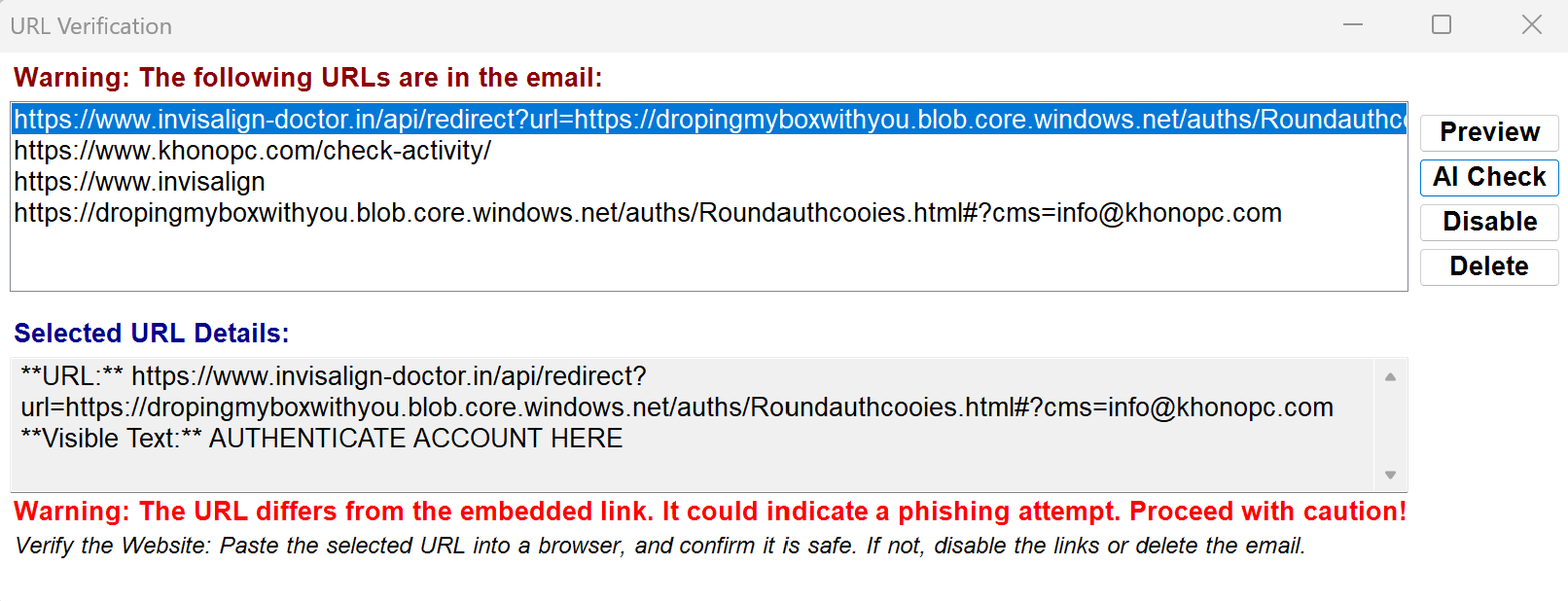
Deceptive links disguised as trusted brands, designed to trick users into clicking.
Common lures pretending to be bills, deliveries, or account updates.
Links designed to steal passwords or personal information through fake login pages.
Runs directly inside Outlook without changing your workflow.
Every link is checked instantly before you open it.
Shows a clear, simple warning when a link looks suspicious.
Runs efficiently without slowing down Outlook.
Anyone who opens links in emails and wants an extra layer of safety without changing how they work.
Businesses that rely on email daily and want simple, reliable protection without IT complexity.
Teams working from different locations who need consistent protection across devices.
People who want security that “just works” without needing to understand phishing or cyber threats.
You receive an email in Outlook
You click a link
The link is inspected before opening
A warning appears if it looks suspicious
You decide safely
Outlook Protection runs entirely on your device. No emails, links, or personal data are sent to any server. Everything stays inside Outlook, giving you full control and complete privacy.
Try Outlook Protection free for 10 days and decide with confidence.
Download Free Trial